|
||||||||||||||||||||||||||||
|
||||||||||||||||||||||||||||
Troy's Open D Dobro Lessons Although Troy's wesite is aimed at the Dobro-player, there's a whole buch of video lessons for open D tuning, rather than the more usual Dobro tuning of GBDGBD.
The full lesson can be purchased from Troy's website, I was surprised at just how cheap this lesson is... for over 90 minutes + TABs etc! Just go to Troy's site & have a look! |
||||||||||||||||||||||||||||
|
||||||||||||||||||||||||||||
A "TAB" or "Tablature" is a form of written music that can be understood & played or written by someone who can't necessarily read or write music (in written "score" or standard notation). TABs
consist of lines representing the strings with numbers indicating
the fret at which the bar is placed. TABs
often appear with the musical notation or "score" also
written, which can help you learn what the note-length symbols mean
if you know how the tune goes. Learning from TABs is a quick way to get new tunes sorted, increasing your musical vocabulary, or for pinning down those elusive phrases. And
it works both ways... All
you need is some paper and something to write with. Whether
you're TABbing out your own ideas or working something out from an
audio/video recording, pencil & paper will do, but using a software
TAB editor really helps a lot. For a comprehensive guide to TAB, click here. |
|
Resources For
Blank TAB paper to print, just click here.
TAB creation / editing software PowerTAB
software Download
it here: TablEdit
software
|
If you
use  for your audio playback there's a nifty plugin called "Pacemaker". for your audio playback there's a nifty plugin called "Pacemaker".You can use it to slow things right down to nail those tricky licks without altering the pitch! Also you can shift the pitch higher & lower to change the key of the song without altering the tempo, get it  here. here. |
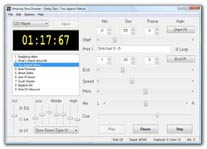
There's a standalone application called "Amazing Slow-Downer" which basically does the same as the Pacemaker Winamp Plugin, but also allows the user to set start & end points for loop play. Here's a screenshot:
|


 Click here to see the hollowneck YouTube playlists